Many who begin their IT careers start by working as helpdesk professionals, assisting customers with a wide range of technical issues.
This article covers the key skills, best practices, and strategies for success in a helpdesk role, from handling common issues to staying calm under pressure. Whether you’re starting out or refining your approach, these tips will help you deliver effective customer support.
1. Master the Art of Active Listening
Before you start troubleshooting, take a moment to truly understand the problem and give them time to explain the issue. Listen carefully, and don’t be afraid to ask clarifying questions.
A good strategy is the ‘The 4 W’s of Troubleshooting‘ which is designed to quickly identify and capture key details about an issue. These details are invaluable when trying to understand the problem and essential when others are trying to solve the problem
The 4 W’s of Troubleshooting
- What:
- What exactly is the issue?
- What are the symptoms, error messages, or unexpected behaviors?
- What has changed recently (updates, new devices, etc.)?
- When:
- When did the issue start? (Now, Last Week, Forever)
- Is it intermittent or consistent?
- Has it happened before?
- Where:
- Where is the problem occurring (specific device, location, or software)?
- Is it isolated to one user or affecting multiple users?
- Who:
- Who is experiencing the issue? (The caller, a customer?)
- Does the user have the proper permissions/access to raise the ticket?
- Are others reporting similar issues?

2. Document Everything: Push Everything Into A Ticket
A golden rule of helpdesk is that every interaction is ticketed and call logs left.
While it’s nice to personally fix things over the phone, the reality is this is not always possible and can be detrimental if no one knows the interaction occurred or how what you did should it be relevant again.
Help desk tickets allow support teams and customers to track specific issues from reporting to resolution, providing a structured way to document the problem, manage communications and ensure the the issue is resolved.
A ticket should include:
- A clear description of the issue
- All the information from ‘The 4 W’s of Troubleshooting’ listed above
- Steps to reproduce the issue, expected vs. actual outcomes
Any relevant screenshots or logs, and the environment where the issue occurred (e.g., device, browser, version) - Contact details of the customers and prefered contact method.
When working on the ticket, include private notes that:
- Detail the fix and troubleshooting step used to diagnose the issue
- Reference to setting changes made
- Other information such as if approval were sought for a certain action
- Notes for other staff who may open or work on the ticket
- Progress on the ticket: ie Waiting for response from supplier
Just as important as the ticket are call notes which MUST be left for every interaction.
A call history in a helpdesk should include:
- Customer Information: Name, contact details, and ticket number.
- How You Authenticated them: 2FA code
- Call Details: Date, time, and issue summary.
- Agent Notes: Key points discussed, steps taken like raise a ticket, and resolution status.
- Follow-up Actions: Any next steps the customer may contact about or that the next agent should know about
💡 Pro tip: Use templates for efficiency and consistency!

3. Dig Beyond Just Solving The Immediate Problem
To effectively resolve issues, it’s crucial to dig beyond the surface of the customers issue.
Often, the problem reported isn’t the root cause, and understanding the full context, such as user environment, recent changes, or even underlying patterns, can help identify the real issue.
Helpdesk agents should ask probing questions, review data like logs, and take the time to look into related tickets or calls to uncover deeper insights. This approach not only resolves the immediate problem but also helps uncover larger underlying issues.
For example, blindly unlocking a user’s account without checking the logs could overlook important details like suspicious activity, a compromised password, or access from a new location, which may indicate a bigger security concern. This is particularly important for recurring issues!

4. Learn & Document Common Fixes
To effectively address recurring issues, create a cheat sheet and documented workflows for common problems:
- Share knowledge with the team to ensure everyone follows the same procedures and improves solutions over time.
- Identify recurring issues (e.g., password resets) and track them over time.
- Create a cheat sheet with common problems, causes, steps to resolve including code snippets and escalation protocols.
- Develop workflows with standardised steps for resolving issues, ensuring consistency, efficiency and to avoid important steps being skipped.
- Keep documentation updated by adding information on new issues, ensuring the steps are still relevant as time goes on (new software versions) and adding new information such as best practices or lessons learnt
5. Work Fast: Leverage Scripts, Tools and Automation
Working at a fast pace is essential for help desk operations, and in some organisations you’re job may count on it!
If you find yourself repeating the same steps daily:
- Create macros with automated responses to save time and energy.
- Create scripts and tools to quicker to perform tasks.
- Bookmark important internal and external resources
- Learn shortcuts to solve common problems, in some cases using command line can be far faster than the GUI!
- Setup your work environment correctly: Dual Screens, pinned windows
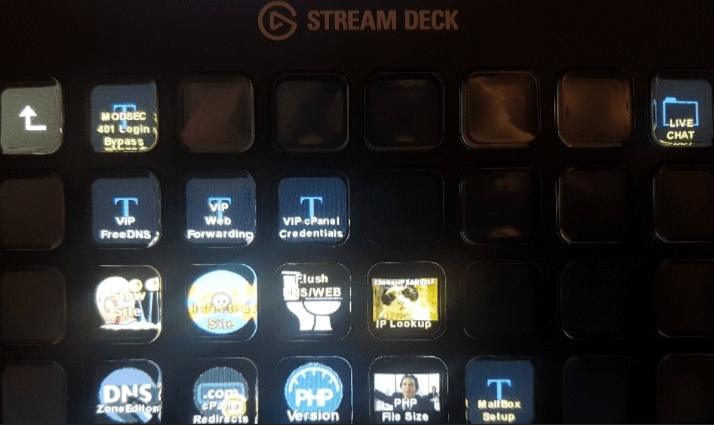
An example of this automation occurred while working for a major hosting provider, where I used a Stream Deck. By programming buttons to instantly generate 90% of a tickets’ template and content for common ticket issues, I significantly reduced the time it took to write a quality response.
6. Stay Calm Under Pressure, Don’t Take It Personally
Helpdesk work can often feel overwhelming with multiple tickets coming in and more often than not a frustrated customer at the other of the phone.
An important part of the job is staying calm, maintaining composure and approaching each task methodically one at a time. Keep a positive, solution-oriented mindset, and avoid letting stress affect your work or interactions.
If you face negative criticism or even abuse, it’s crucial to separate it from yourself personally. Often, these emotions are directed at the systems, processes, or the company as a whole, not at you as an individual.

7. Invest in Soft Skills
While technical expertise is required for helpdesk work, soft skills like empathy, patience, and communication are equally important. These abilities help you build trust, defuse tense situations, and ensure users feel heard and supported.
- Empathy: Putting yourself in the user’s shoes helps you understand their frustrations and concerns. Practice active listening. Let them explain their issue fully before responding.
- Patience: Users may not always be tech-savvy, which can lead to miscommunication or repeated questions. Practice staying calm, taking care not to appear to talk down to them and thank them for getting in contact.
- Communication: Explaining technical solutions in a simple, non convoluted technical way is an important skill to have. Learn to break down complex issues into straightforward relevant terms which the end user is likely going to be able to understand.
Soft skills while seemingly secondary, are very important and go a long way in offering good customer service.
8. Know When to Escalate
Not every issue can be resolved at your level, and knowing when to escalate is a crucial skill in helpdesk work. Recognising the limits of your knowledge or authority ensures problems are handled by the right team, saving time and preventing further complications.
- When to Escalate: Escalate when an issue requires specialised knowledge, access, or approval that you don’t have.
For example, a system-wide outage or indications of a security breach should be promptly passed to your supervisor once you have detailed the key facts. - How to Escalate Effectively: Provide clear and concise documentation of the issue when escalating (4 W’s of Troubleshooting). Include a summary of the issue, steps you’ve already taken, error messages, and any other details relevant to the case.
Be sure to let the customer know that you have escalated the issue and give a realistic timeframe of when they might next hear back from you. - Teamwork Over Giving Up: Escalating or asking for assistance isn’t a failure, it’s the right thing to do. Keep tabs on the ticket to see how it was resolved and don’t be afraid to ask for more training or an explanation on if this was an issue you could solve yourself.

9. Learn & Contribute Back
The tech industry evolves rapidly, so staying informed is key to success in a helpdesk role. Regularly read blogs, follow industry news, and explore updates to tools and products relevant to your work.
Free resources like online courses, webinars, and newsletters can keep you up to date without breaking the bank.
In addition to learning, contribute back by creating or improving documentation. Write how-to guides, FAQs, troubleshooting explanations, and training materials for both internal and external use. Most companies have internal knowledge bases, blogs, or support sites that can always benefit from better content.
10. Maintain a Sense of Humor
Helpdesk work often comes with amusing moments, like users insisting their computer is out to get them or printers acting up at the worst times. Embrace these quirks and find the humor in your day-to-day tasks.
Sharing funny stories with colleagues or lighthearted moments with users can diffuse tension and create a more positive atmosphere. A good laugh and positive attitude not only brightens your day, but one also for everyone else
Final Thoughts
Working helpdesk while often an entry job or glamorous, is still not easy and you are dealing with real people with very real problems.
Hopefully these tips have been valuable and help you throughout your career
Do you have any helpdesk tips or experienced any funny helpdesk moments? Share in the comments below