When people think about IT, they often picture fixing broken computers, setting up new users or solving printer problems. Behind the scenes, however, one of the most important responsibilities and less glamorous of any IT operation is patch management.
Keeping systems up to date isn’t simply a matter of clicking “Install Updates.” Effective patch management is a structured process that reduces security risks, improves reliability and helps ensure systems continue operating as expected. Whether you’re managing a handful of office computers or thousands of servers across multiple sites, applying software updates correctly is a fundamental part of maintaining a healthy IT environment.
In this article, we’ll look at what patch management is, why it matters, how organisations prioritise updates and the best practices that experienced IT professionals follow every day.
What Is Patch Management?
Patch management is the process of identifying, testing, deploying and verifying software updates across an organisation’s IT systems.
A patch is a piece of software released by a vendor to address a specific issue. Depending on the update, it may:
- Fix a security vulnerability.
- Correct software bugs.
- Improve stability.
- Add compatibility with new hardware.
- Introduce new features.
- Improve performance.
Patch management extends far beyond operating systems. Modern organisations must also keep applications, web browsers, drivers, firmware, networking equipment and security software up to date. A computer with the latest version of Windows can still present a significant security risk if its browser, PDF reader or VPN client hasn’t been updated for years.
Why Software Updates Matter
Security
The most important reason to install updates is security.
Software vulnerabilities are discovered every day by security researchers, software vendors and cybercriminals. Once a vulnerability becomes public knowledge, attackers often begin scanning the internet for vulnerable systems within minutes. Automated bots continuously search for outdated software, looking for devices that can be compromised before administrators have had a chance to apply the necessary patches.
In many cases, organisations aren’t specifically targeted. Instead, attackers cast a wide net using automated tools that identify systems running vulnerable versions of operating systems, web servers, remote access software and other commonly used applications. If a vulnerable system is found, it may be exploited automatically with little or no human involvement.
This is why timely patching is so important. Applying security updates helps close or mitigate known vulnerabilities before attackers have an opportunity to exploit them. While no system can ever be completely secure, keeping software up to date significantly reduces the attack surface and removes many of the opportunities that cybercriminals rely on.
It’s also worth remembering that operating systems aren’t the only concern. Web browsers, VPN clients, office applications, PDF readers, Java runtimes, backup software and countless other third-party applications regularly receive security updates. An organisation that keeps Windows fully patched but neglects its third-party software can still leave itself exposed to avoidable security risks.
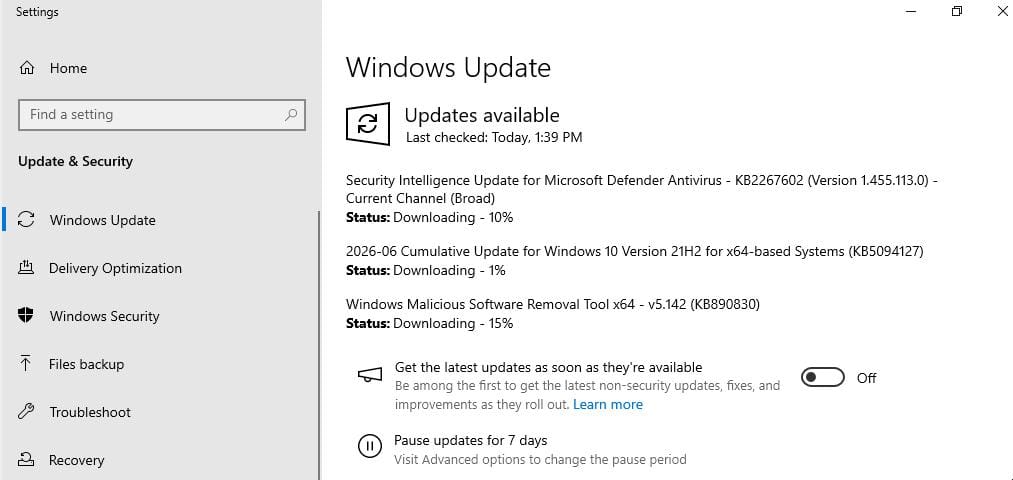
Stability and Reliability
Not every update is about cybersecurity.
Many software updates are released to resolve bugs and improve the overall reliability of a product. Issues such as application crashes, memory leaks, printing problems, networking faults or unexpected behaviour often only become apparent after software has been deployed across a wide range of real-world environments. As these issues are identified, vendors release patches to address them.
Updates may also improve compatibility with newer hardware, operating systems or integrations with other software, helping to prevent issues before they occur.
Keeping software reasonably up to date generally leads to a more stable and reliable environment. While no update can guarantee perfect stability, regularly applying vendor fixes helps reduce the likelihood of known issues affecting users and ensures you’re benefiting from the continual improvements made throughout the software’s lifecycle.
Performance & New Features
While updates aren’t primarily intended to improve performance, some include optimisations that reduce resource usage, improve efficiency or resolve performance bottlenecks. These improvements may not always be obvious, but they can contribute to a smoother and more responsive user experience over time.
Graphics drivers are a common example. Both consumer and enterprise GPU vendors regularly release updated drivers that improve performance, add support for new technologies and optimise applications. In some cases, newer drivers can deliver double-digit performance improvements or enable hardware acceleration features that weren’t previously available.
Software updates may also introduce new functionality. This could include additional security features, improved management capabilities, better accessibility options or support for new hardware and industry standards. While new features are generally welcomed, organisations often test feature updates carefully before deploying them to ensure they don’t disrupt existing workflows.
Performance improvements and new features should be viewed as valuable benefits rather than the primary reason for updating. In some cases, particularly with graphics drivers and other hardware-specific software, organisations may choose stable or long-term support (LTS) releases over the very latest versions. Stable releases prioritise reliability and compatibility, while the latest drivers often deliver new features, hardware support and performance improvements. Choosing the appropriate release depends on the environment, but security, stability and reliability should always remain the primary considerations.
Compatibility
Modern software and hardware evolve continuously.
New versions of applications, cloud services and hardware often rely on updated operating systems, drivers and software frameworks. As technology advances, older systems may no longer support modern security standards, file formats or application requirements, leading to compatibility issues.
New hardware and ‘hardware replacement cycles’ is another common example of keeping updated. Devices such as printers, graphics cards and wireless adapters often require updated drivers or newer operating system versions to function correctly. Similarly, business applications may eventually require a more recent operating system before they can be installed or supported.
Vendor Support
Software vendors typically provide support only for current or recently released versions of their products. Once software reaches its end of support or end of life, it no longer receives security updates, bug fixes or technical assistance.
Running unsupported software can expose organisations to unnecessary risks. If a critical issue arises, the vendor may be unable to provide a fix, and compatibility with newer hardware or applications may also become limited. In some industries, using unsupported software can even create compliance or audit concerns.
Keeping software within its supported lifecycle ensures continued access to security updates, technical support and vendor resources, while reducing the operational risks associated with ageing systems.
It’s not uncommon to find organisations across all industries running business-critical applications on legacy systems that are no longer supported. While this may seem manageable in the short term, it often becomes a costly and risky trap. The longer upgrades are delayed, the more difficult they become. Vendor support disappears, unpatched security vulnerabilities accumulate and require additional mitigations, compatible hardware becomes harder to source, and migration paths become increasingly complex. In many cases, what could have been a straightforward upgrade eventually turns into a major infrastructure project.
Understanding Patch Severity
Not every update requires the same level of urgency.
Most organisations prioritise patches based on the potential impact if the vulnerability were exploited.
Many security advisories reference Common Vulnerabilities and Exposures (CVE) identifiers to uniquely identify vulnerabilities and use the Common Vulnerability Scoring System (CVSS) to provide a standardised severity rating. As you gain experience in IT, you’ll encounter both terms regularly, and they are useful for understanding the potential impact of newly disclosed vulnerabilities.
It’s important to remember that severity ratings are only one factor when determining patch priority. The environment in which a system operates, whether it is internet-facing, the sensitivity of the data it stores and the availability of public exploits all influence how quickly an update should be deployed. For example, a medium severity vulnerability on a public-facing web server may warrant a faster response than a critical vulnerability affecting an isolated test machine with no external connectivity.
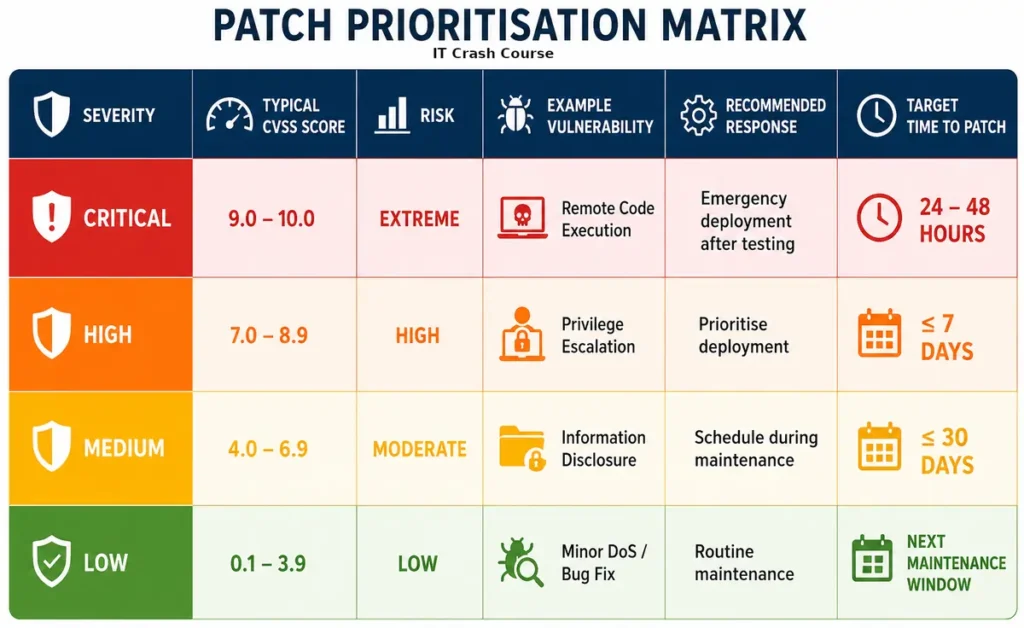
Critical
Critical updates address vulnerabilities that can often be exploited remotely with little or no user interaction. These vulnerabilities typically affect internet-facing services, operating systems or widely used applications, and may allow attackers to execute malicious code, gain unauthorised access or compromise entire systems.
Because of the potential impact, critical patches should receive the highest priority. In many organisations, these updates are assessed immediately, tested as quickly as practical and deployed within 24 to 48 hours, or sooner if there is evidence of active exploitation. Where immediate patching isn’t possible due to business constraints, temporary mitigations such as disabling vulnerable services, restricting network access or applying vendor-recommended workarounds should be considered until the update can be installed.
Although responding quickly is important, critical patches should still undergo an appropriate level of testing where feasible. A rushed deployment that causes widespread outages can be just as disruptive as the vulnerability itself, so balancing urgency with operational stability is an important part of effective patch management.
High
High severity updates address vulnerabilities that present a significant security risk but generally require specific conditions, user interaction or a higher level of access before they can be successfully exploited. While they may not pose the same immediate threat as critical vulnerabilities, they can still lead to system compromise, data breaches or privilege escalation if left unpatched.
These updates should be prioritised as part of the next planned deployment cycle and are commonly deployed within seven days. Administrators should consider factors such as whether the affected system is internet-facing, the sensitivity of the data it stores and whether exploit code has become publicly available.
As with critical updates, testing remains important, particularly for business-critical applications and production environments. The goal is to reduce security risk promptly while minimising the chance of disrupting normal business operations.
Medium
Medium severity updates address vulnerabilities that present a moderate level of risk and are generally less likely to be exploited than critical or high severity issues. Exploitation may require specific system configurations, authenticated access or a combination of conditions that make successful attacks less straightforward.
While these vulnerabilities don’t usually require an emergency response, they should still be addressed as part of a regular patch management programme. In many organisations, medium severity updates are deployed during the next scheduled maintenance window or within 30 days, helping to reduce risk without unnecessarily disrupting business operations.
It’s important not to allow medium severity updates to accumulate over time. Individually they may present a relatively low risk, but a large number of unpatched vulnerabilities can increase an organisation’s overall attack surface and make systems more difficult to maintain securely.
Low
Low severity updates typically address vulnerabilities with limited impact, issues that are difficult to exploit or minor software defects. While they generally pose a lower security risk, they should still be included as part of routine maintenance to keep systems secure, stable and fully supported.
These updates are often deployed during scheduled maintenance windows alongside other routine software updates. Although there is usually no urgency, allowing low severity patches to accumulate over long periods can contribute to technical debt and make future maintenance more difficult.
A Typical Patch Management Process
Successful patch management follows a repeatable process rather than relying on ad hoc updates.
1. Maintain an Asset Inventory
You can’t patch systems you don’t know exist.
Maintaining an accurate inventory of servers, workstations, laptops, networking equipment and installed applications is the foundation of effective patch management. Without a complete inventory, devices can easily be overlooked, leaving them unpatched and potentially vulnerable.
Your asset inventory should identify what each device is, who it belongs to, its operating system and its role within the organisation. This allows administrators to prioritise critical systems, identify unsupported software and ensure no assets are missed during routine maintenance.
A well-maintained asset inventory supports not only patch management, but also security audits, software licensing, support and hardware lifecycle planning.
2. Identify Available Updates
The next step is identifying which updates are available and determining whether they apply to your environment.
Software vendors regularly release security patches, bug fixes, driver updates and feature improvements. Rather than manually checking each vendor’s website, most organisations rely on an RMM or dedicated patch management platform to automatically detect missing operating system and third-party software updates across all managed devices.
As your environment grows, manually tracking updates quickly becomes impractical. At scale, using a centralised patch management platform is essential for maintaining visibility, ensuring consistent deployments and reducing the risk of critical updates being overlooked.
3. Assess the Risk
Not every update requires the same level of urgency, so the next step is to assess the risk and determine an appropriate deployment priority.
Consider questions such as:
- How severe is the vulnerability?
- Is the affected software installed?
- Is the system internet-facing?
- Is the vulnerability being actively exploited?
- How critical is the affected system to business operations?
The answers to these questions help determine how quickly an update should be deployed. For example, a critical vulnerability affecting an internet-facing web server will generally require a much faster response than the same vulnerability on an isolated test machine. Assessing risk allows organisations to focus their efforts where they will have the greatest impact while balancing security with operational stability.
4. Test Updates
Whenever possible, test updates before deploying them broadly across your environment.
While the vast majority of updates install without issue, some can introduce compatibility problems with business applications, drivers or hardware. Rather than deploying updates to every device at once, many organisations use deployment rings (also known as deployment circles, progressive roll outs or pilot groups). Updates are first released to a small group of test devices or IT staff, followed by a larger group of users and finally the remainder of the organisation once confidence has been established.
The importance of staged deployments was highlighted by the 2024 CrowdStrike incident, where a faulty content update for the CrowdStrike Falcon sensor caused millions of Windows systems worldwide to crash with a Blue Screen of Death (BSOD). Organisations that deployed the update to all endpoints immediately experienced widespread outages, whereas those using deployment rings were better positioned to detect the issue before it affected their entire fleet.
Although incidents of this scale are rare, they reinforce an important principle of patch management: never deploy updates to every system simultaneously. A staged rollout provides an opportunity to identify unexpected issues while limiting the impact should something go wrong.
5. Schedule Deployment

Once updates have been tested and prioritised, they should be scheduled for deployment during planned maintenance windows wherever possible. This minimises disruption to users while allowing administrators to monitor the rollout and respond quickly if any issues arise.
Maintenance windows are often scheduled outside normal business hours and should allow sufficient time for updates, reboots and post-deployment verification. Users should also be notified in advance if downtime or restarts are expected.
Critical security updates may require an accelerated deployment schedule, particularly if there is evidence of active exploitation or the affected systems are internet-facing. In these situations, reducing security risk takes priority, even if updates need to be deployed outside the normal maintenance cycle.
6. Deploy the Updates
In professional environments, updates are rarely installed manually on individual computers.
Instead, administrators use an RMM or dedicated patch management platform to deploy updates across hundreds or even thousands of endpoints from a central management console. These platforms can automate operating system and third-party application patching, schedule deployments during maintenance windows, roll updates out using deployment rings and provide real-time visibility into installation progress.
Modern cloud-based platforms such as Action1 also allow remote devices to receive updates over the internet, enabling organisations to patch laptops and remote workers without requiring them to connect to a corporate VPN. This ensures devices remain secure regardless of where they are located and significantly reduces the administrative effort involved in managing updates at scale.
7. Verify Installation
Never assume an update installed successfully.
Once deployment has completed, verify that devices have received the update, restarted if required and are reporting the expected patch level. Even well-planned deployments can encounter issues, so confirmation is an essential part of the patch management process.
Some devices may have been offline during deployment, fallen outside the intended deployment scope or experienced installation failures due to software conflicts, insufficient disk space or other errors. Without verification, these systems can remain vulnerable despite the update being approved and deployed.
Modern patch management platforms make this process much easier by providing compliance dashboards and deployment reports that identify failed installations, offline devices and endpoints with missing updates. Administrators can then investigate these exceptions, remediate any issues and redeploy updates where necessary to ensure the environment remains fully compliant.
8. Monitor for Issues
Deploying an update isn’t the end of the process. After installation, systems should be monitored for unexpected behaviour, application failures, performance issues or user-reported problems that may have been introduced by the update.
While most updates are successful, compatibility issues can occasionally affect specific hardware, applications or configurations that weren’t identified during testing. Monitoring allows administrators to detect these problems early and minimise their impact on users.
If issues arise, investigate promptly to determine whether the update should be rolled back, a vendor workaround applied or a revised update deployed once available. Capturing these lessons also helps improve future testing and deployment processes.
9. Document the Results
The final step is to document the outcome of the deployment.
Maintain records of what was updated, when it was deployed, which systems were affected and whether any issues or exceptions occurred. This creates a clear history of changes and makes it easier to troubleshoot problems if they arise later.
Good documentation also provides an audit trail for compliance requirements and demonstrates that security updates are being managed consistently. Many patch management platforms automatically record deployment history, installation status and compliance reports, reducing the administrative effort while providing valuable historical data for future reference.
Best Practices
Experienced system administrators tend to follow similar principles regardless of the environment they’re managing.
Patch Regularly
Delaying updates for months creates unnecessary risk. A predictable patching schedule is far more effective than waiting until problems arise or applying updates only when prompted by a security incident.
Many organisations establish regular maintenance windows for routine patching. Client devices are commonly updated on a weekly schedule, often outside business hours such as early Sunday morning, while servers are typically patched monthly during planned maintenance windows. It’s also common practice to schedule a restart during these maintenance windows, even if no updates are installed. This helps complete any pending updates, applies changes that require a reboot and ensures systems aren’t left running indefinitely without restarting.
Having a consistent schedule helps users know when to expect maintenance, simplifies change management and ensures systems don’t gradually fall behind on critical security updates. While emergency patches may occasionally require immediate deployment, most updates can be managed effectively through a well-defined and repeatable patching cycle.
Use a Centralised Patch Management Platform
As the number of managed devices grows, manual patching quickly becomes impractical.
Most organisations use an RMM or dedicated patch management platform to automate routine tasks while still allowing administrators to control when updates are deployed.
Solutions such as Action1 can automatically detect missing updates, deploy operating system and third-party application patches, schedule maintenance windows and generate compliance reports from a single web-based console. This reduces administrative overhead while improving consistency across the environment and a must-have for even small networks.
Test Before Wide Deployment
Testing doesn’t eliminate every issue, but it significantly reduces the chance of introducing widespread problems into production environments.
Prioritise Security Updates
Not all updates are equally important. Security updates that address known vulnerabilities should generally take priority over feature updates, cosmetic improvements or optional enhancements.
When deciding what to deploy first, consider factors such as the severity of the vulnerability, whether it is being actively exploited, if the affected system is internet-facing and how critical it is to business operations. This risk-based approach ensures time and resources are focused where they will have the greatest impact. Many RMM platforms can prioritise installing certain types of updates and severity automatically.
Feature updates still have their place, but they can often be scheduled separately after appropriate testing. Prioritising security updates helps reduce an organisation’s attack surface while maintaining a stable and predictable update cycle.
Don’t Forget Third-Party Software
Operating systems aren’t the only software that requires maintenance.
Browsers, office applications, PDF readers, Java runtimes, VPN clients, backup software and many other third-party applications regularly receive security updates. In many cases, vulnerabilities in these applications are just as attractive to attackers as those found in the operating system itself.
An effective patch management strategy should include both operating system, third-party applications, drivers and even BIOS updates to ensure all endpoints remain secure and fully supported.
Keep Reliable Backups
Although update failures are uncommon, they do happen.

Before deploying updates, particularly to servers and business-critical systems, ensure reliable and verified backups are available. If an update causes unexpected issues, a recent backup can significantly reduce downtime and simplify recovery.
Following a proven backup strategy, such as the 3-2-1 Backup Rule, provides an additional layer of protection against update failures, hardware faults and other unexpected incidents. If you’re unfamiliar with this approach, see our article “Data Security: Understanding the 3-2-1 Backup Rule“ for a detailed explanation.
Backups should be viewed as an essential part of any patch management process, providing confidence that systems can be restored if something doesn’t go according to plan.
Verify Compliance
Patch management doesn’t end once updates have been deployed.
Regular reporting helps identify devices that failed to update, systems that haven’t connected recently and computers that remain vulnerable.
Rules of the Trade
Over time, most IT professionals develop a few simple rules that consistently prove their value.
- Never assume automatic updates are working correctly.
- Never deploy major updates to every production system at the same time.
- Always verify that updates installed successfully.
- Test where practical before deploying broadly.
- Keep reliable, tested backups before performing significant maintenance.
- Prioritise systems that are exposed to the internet.
- Remember that third-party software often introduces just as much risk as the operating system itself.
- Document systems that cannot be patched and understand the associated risks.
- If software has reached end of support, replacing it is usually safer than continuing to rely on it indefinitely.
These aren’t strict rules, but they represent habits that help experienced administrators avoid many common problems.
Common Mistakes
Even well-managed environments occasionally experience patch management issues.
Some of the most common mistakes include:
- Ignoring firmware updates for servers, storage and networking equipment.
- Forgetting remote laptops that rarely connect to the corporate network.
- Delaying updates indefinitely because “everything is working.”
- Installing every update immediately without considering potential business impact.
- Failing to confirm that updates installed successfully.
- Relying solely on manual processes as the environment grows.
Most of these problems aren’t caused by technical limitations. They’re usually the result of inconsistent processes.
A Practical Patch Schedule
Every organisation has different requirements, but many follow a schedule similar to the one below.
| Patch Severity | Typical Response |
|---|---|
| Critical | Deploy as soon as practical after appropriate testing |
| High | Deploy within several days |
| Medium | Include in the next scheduled maintenance window |
| Low | Deploy during routine maintenance |
These timeframes aren’t fixed rules, however many larger organisations do have policies which enforce when patch’s need to be installed. A critical vulnerability affecting an isolated laboratory computer doesn’t carry the same urgency as one affecting an internet-facing production server.
Good judgement is just as important as following a schedule.
Final Thoughts
Patch management rarely receives much attention when everything is working correctly, and that’s exactly how it should be.
Most successful cyberattacks don’t rely on sophisticated techniques. They take advantage of systems that were left vulnerable because available updates weren’t installed. At the same time, experienced IT professionals understand that patching isn’t simply about installing every update the moment it’s released. It requires planning, testing, prioritisation, verification and a little common sense.
Modern RMM and patch management platforms have made the process significantly more efficient, allowing administrators to manage thousands of endpoints from a single console. However, even the best software cannot replace good judgement, thorough testing and well-defined procedures.
Whether you’re managing ten computers or ten thousand, effective patch management remains one of the simplest and most valuable ways to improve security, reliability and long-term system health. Like many areas of IT, success comes from following a consistent process rather than relying on luck.
What are your tips for patching? Let us know your thoughts in the comments below