No matter how strong your security setup is, incidents can and will unfortunately still happen sooner or later. A security incident could be anything from a suspicious email to a ransomware attack or a compromised user account. Knowing how to respond quickly and calmly makes all the difference.
In this article, we’ll break down the basics of incident response in a way that’s clear, structured, and easy to apply. Whether you’re managing a small network or just starting out in IT, understanding the steps involved in handling security incidents is an essential skill.
What is a Security Incident?
A security incident is any event that compromises the confidentiality, integrity, or availability of your data or systems. Some incidents are small and easily managed, while others can quickly grow into serious breaches.
Here are a few examples:
- An employee clicks a phishing link and enters their password on a fake site
- A malware infection causes files to be encrypted
- An attacker gains access to a user’s account
- A system is unexpectedly shut down due to outside interference
Not every suspicious event is an major incident, but it’s always better to investigate and confirm than to assume everything is fine.
Why Incident Response Matters
A fast and effective response can limit damage, reduce downtime, and help maintain trust. Failing to respond properly can lead to data loss, legal trouble, financial loss, and reputational damage.
Even simple actions like isolating a compromised device or reporting a phishing email quickly can stop an incident from spreading.
Having a documented response plan also gives you clarity in a stressful moment. Instead of guessing what to do, you can follow a set of steps to handle the situation in a controlled, efficient way ensuring nothing is overlooked.
The Basic Steps of Incident Response
Incident response often follows a six-step process. This framework is used by security teams around the world, but the same steps apply no matter how small your setup is.
Let’s walk through each one.
1. Preparation
The best way to handle an incident is to be ready before it happens. Preparation means having the right tools, policies, and training in place so everyone knows what to do.
Key things to focus on:
- Create an incident response plan and make sure your team knows it
- Train users to report suspicious activity
- Keep backups updated and test your recovery process
- Use antivirus, firewalls, and security monitoring tools
Preparation doesn’t eliminate incidents, but it makes you faster and more confident when one occurs.

2. Identification
This step is about recognising when something might be wrong. Early detection helps you act quickly.
Look out for signs such as:
- Unusual login attempts or access patterns
- Devices running slowly or behaving strangely
- Alerts from antivirus or monitoring tools
- Reports from users about suspicious emails or messages
The goal is to confirm whether a real incident is happening. If you’re unsure, it’s better to treat it seriously and investigate.
3. Containment
Once an incident is confirmed, the first job is to stop it from getting worse. This is where containment comes in.
Depending on the situation, containment might involve:
- Disconnecting a device from the network
- Disabling a compromised account
- Blocking access to affected systems
- Preventing the spread of malware
Containment doesn’t fix the problem but helps limit the damage so you can move on to the next steps safely.
4. Eradication
After an incident is contained, you need to remove the cause of the issue. This step involves cleaning up the systems and making sure the threat is gone.
Examples of eradication include:
- Removing malware from infected devices
- Resetting compromised passwords
- Patching vulnerabilities that were exploited
- Reviewing logs to make sure all traces of the attack are removed
Take your time here! If something is missed, the incident could happen again.

5. Recovery
Now it’s time to restore normal operations. The recovery step ensures that affected systems are back online and working safely.
This might involve:
- Restoring data or systems from backups
- Reconnecting devices to the network
- Monitoring systems for unusual activity
- Communicating with users about any changes or downtime
Recovery can be quick for small incidents, but may take longer for large ones. The key is to avoid rushing or being pressured back into normal operations before you’re sure everything is secure.
Clearly communicating with users and providing some functionality, even if very limited will be key!
6. Lessons Learned
After the incident is resolved, take time to review what happened. This final step often gets skipped, but it’s where real improvement comes from and where important reporting responsibilities are handled.
Start by asking key questions:
- What caused the incident?
- When did it occur?
- How well did our team respond?
- What worked, and what didn’t?
- How can we improve our tools, training, or processes?
Document everything clearly so that next time, your response is even faster and more effective. Create a detailed timeline of events, including detection, containment, eradication, and recovery. This helps identify what went right, where delays occurred, and what needs to be improved.
As part of this review, make sure the right people are informed.
Internal Reporting
Share your findings with the relevant internal teams.
IT leadership and management should be updated on the nature of the incident and how it was handled.
If other departments were affected, they should be made aware of any impacts or required follow-up actions.
Use the insights gained to improve your response plans, update employee training, and enhance monitoring systems.
External Reporting
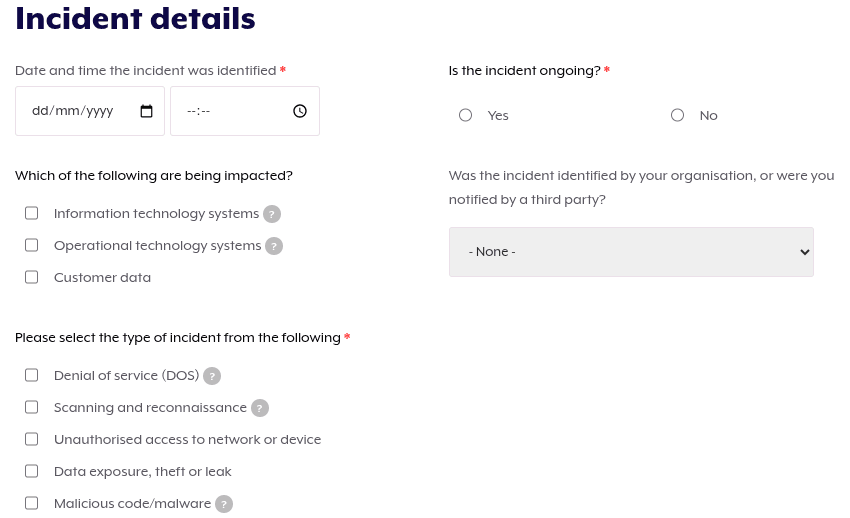
Depending on the type and severity of the incident, you may have external obligations as well.
Some incidents must be reported to regulatory bodies such as Australian Signals Directorate’s Australian Cyber Security Centre within a certain time frame, especially if personal or sensitive data was involved.
Customers, clients, or users affected by the incident may need to be informed.
If third-party systems or services were involved, notify any affected partners or vendors so they can take the appropriate precautions.
In serious cases, such as those involving criminal activity, law enforcement may also need to be contacted.
Make sure you understand your organisation’s reporting requirements in advance so that you can respond quickly and correctly when the time comes.
Simple Things Everyone Can Do
Even if you’re not part of a security team, you can make a big difference in how incidents are handled. Here are some good habits to build:
- Report anything suspicious quickly. Don’t assume someone else already has
- Use strong, unique passwords and enable multi-factor authentication
- Think before clicking on links or downloading attachments
- Keep your devices updated and run regular scans
- Learn how to recognise phishing and social engineering tactics
Security is a team effort. Everyone plays a role in spotting and responding to threats.
Final Words
Security incidents can be stressful, but they don’t have to be chaotic or the end of the world. With a clear process and the right habits, even beginners can respond with confidence and control. By preparing ahead of time, staying alert, and learning from each incident, you’ll build stronger security skills that grow with you.
Whether you’re in a junior IT role or just building your knowledge, learning how to respond to incidents is a key part of becoming security-aware and working in the IT industry.