In this article we review a recent security incident I responded to where the entire network compromised by malware. Some minor details have been changed to protect the client and screenshots recreated.
Incident Summary
In Mid 2024 my team responded to a critical incident for a new client whose manufacturing site was shutdown to a suspected security incident affecting the entire network. On arrival we worked with the in house IT team and lead the investigation to discover the causes.
Key Details
Date: July/2024
Location: SE Asia
Security Incident Type: Unauthorised access and changes to network equipment
Cause: Compound – Firewall Misconfiguration, Weak Compromised Password, MitM attack
Affected Devices: ~150
Downtime: 4 hours
Damage: ~$100,000 USD of lost productivity (estimated)
Symptoms
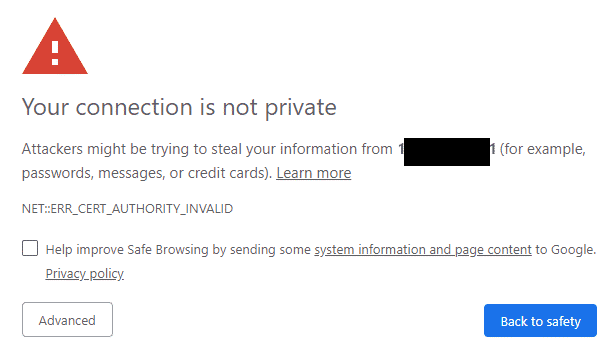
Upon arriving we observed several workstations displaying warnings in the web-browser about invalid certificates and redirecting to suspicious sites. This indicated to us that the IT systems were compromised and this was not just a simple networking failure.
Some of the symptoms witnessed included:
- Failures of critical systems: VOIP, internet enabled manufacturing equipment
- Invalid web browser SSL certificates: Indicating the provided SSL certificate is not valid for the domain being requested
- HSTS web browser Errors: Site owners requiring the site only load if the certificate is valid
- Incorrect sites loading in web-browser and redirects to malicious pages
- Unsafe Site ‘Blocked’ Warnings popups from anti-virus product
Investigation & Root Causes
Potential Cause: Malware (Ruled Out)
One of the first potential causes was malware on the individual machines, the following components were checked:
- Installed Web browser Plugins
- Recently Installed Software
- Malware Scan
While malware scanning did not identify any threats, it was still an important necessary step to rule out.
Ruling out malware being the primary cause of the incident was further ruled out by other devices including mobile devices not usually susceptible to malware also experiencing issues.
Major Symptom: Incorrect DNS Resolution
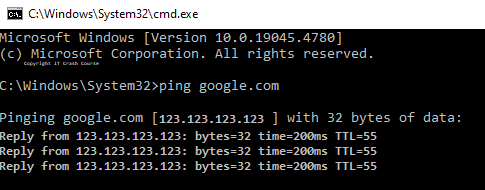
On one of the affected machines, we performed a ping using CMD to identify the IP address the site was resolving to. Interestingly every domain we pinged resolved to the same IP address which immediately pointed to a DNS related cause.
Next we checked the network configuration on the individual computers and identified the router being set as the DNS server both for statically assigned devices and for DHCP devices.

Investigation of the router
Having ruled out an issue with the workstations, the router was now the prime suspect.
We then signed into the ISP supplied ‘Consumer Grade Router’ providing internet access to the entire network.
Weak Default Password
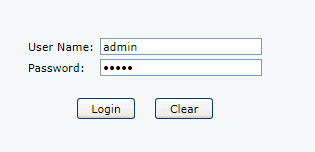
To our horror, we logged into the router using its default admin/admin username and password!
Malicious DNS Servers
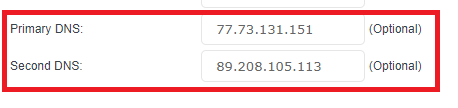
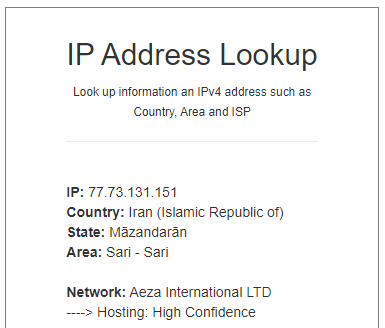
Upon reviewing the configuration we noticed that the two default DNS servers set on the router (77.73.131.151, 89.208.105.113) were not the expected ISP or Google DNS Servers.
This lead to all devices on the network resolving using the two malicious DNS Servers
Looking up the information of the IP address, it supports that the network was intentionally compromised.
Misconfigured Firewall Rules: Router Management Interface Exposed To The Internet
The next part of the investigation was answering “how did these get changed?” and several other burning questions including:
- Is there an attacker within the network?
- Is there a vulnerability with the routers firmware that was exploited?
- Was this changed from inside or outside the network?
The first test for this is testing if the management interface is accessible from the public internet. We used a free online Port Checker for this, sadly it was.
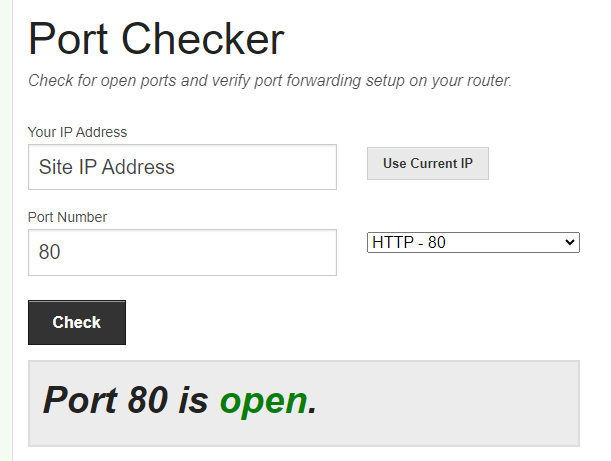
Paired with a weak default password this allowed even an unskilled attacker full and almost uncontested access to the network.
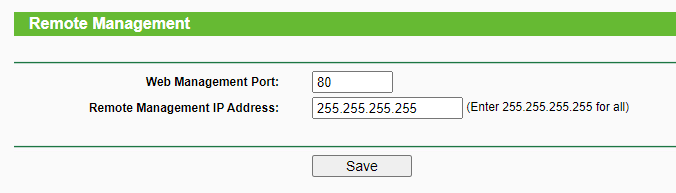
The cause of this turned out to be a recent change to the firewall and router settings when troubleshooting a network issue which was never changed back.
Fault Tree Map (FTA)
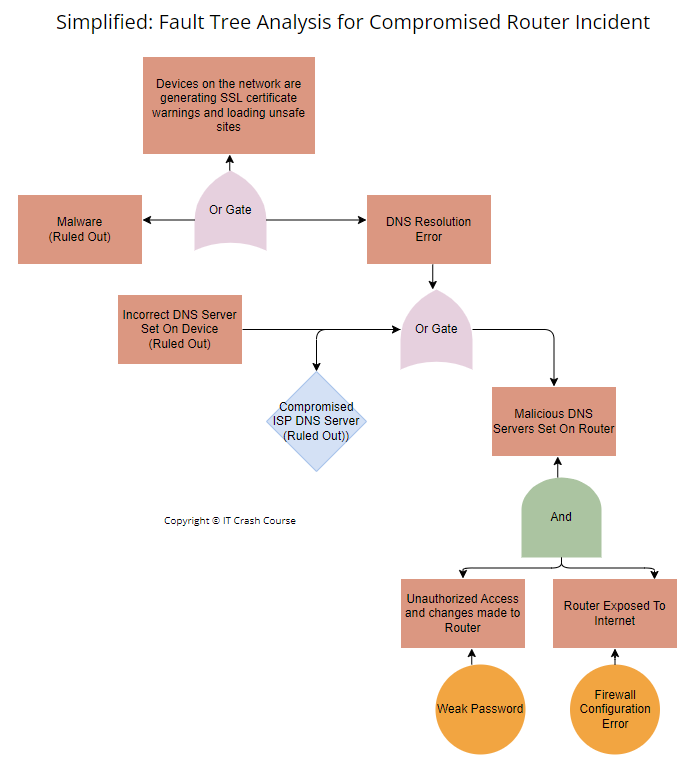
Pictured below is the simplified Fault Tree Analysis to outline the above troubleshooting.
Potential Threats & Implications
After securing the network, we evaluated the likely and potential danger this incident posed both during the attack, and into the future.
These risks included
- Credential Phishing: Account credentials may have been entered into phishing sites posing as the real site and could be used at a later date to gain access
- Malware: Sites that users were redirected to may have downloaded malware onto the machines
- Disruption to critical services: The incident resulted in internet connected machinery failing and shutting down the production line. VoIP phones did not function correctly and calls could not be received or placed.
Immediate Remedy & Follow Up Recommendations
Actions taken to secure the network included:
- Re-image router with the latest firmware and perform a factory reset to ensure the device no longer compromised
- Load a known good configuration file of the routers settings
- Set new secure credentials on all networking equipment
- Review and Test firewall configuration to block external access
- Mandatory Company Wide Password Reset
- Full malware scan of all devices
- Audit & Review logs of system and file access
- Recommended implementing formal procedures and documentation when making network changes
- Recommended replacing consumer network products with enterprise grade hardware
- Recommended the network be designed with VLANS and devices on different subnets
- Recommended the network be designed with high availability and redundancy in mind
Valuable Lessons
Some of the take away lessons learnt from this incident include:
- Never expose management interfaces to the open internet! Management interfaces should only be accessible internally from within an administrative Network. If remote access is needed it should be done through a VPN connecting to the companies network or as last resort only be allowed from a whitelisted IP address.
- Always change vendors default passwords, even if only intended to be access internally!
- Importance of validating network configuration and firewall changes. Ideally through a formal change management process with documentation of what settings got modified.
- Automated Tools exist to warn system administrators of exposed ports
- Critical Infrastructure should have static network configuration and consideration about what DNS Servers are set
- Having backup copies of networking equipment’s configuration is invaluable!
- Never underestimate or disregard a SSL Certificate warning if its happening on multiple large sites
- Enforcing HSTS can help prevent credentials been phished in a MitM attack.
- Even small amounts of disruption can be very expensive!
Similar Reported Events
After researching this incident in more detail, it was discovered that this exact attack is quite common. It has been going on for a number of years across multiple countries and router types.
- Whirlpool (2024): DNS in router set to 77.73.131.151
- Cambium Networks (2023): Customers Devices being Redirected when searching web
- Spiceworks (2022-2024): Anyone here experienced Tenda routers DNS being changed
Did you find this article useful or interesting? Leave us a comment below